


 Home /
 What Does a BMS Do in a Lithium Battery Pack?


Table of Contents
- What Is a BMS?
- What Does a BMS Protect a Battery From?
- How Does a BMS Monitor Cell Voltage?
- What Does Cell Balancing Do?
- Does a BMS Control Battery Current?
- Why Does a BMS Monitor Temperature?
- What Is SOC in a BMS?
- What Is SOH?
- Can a BMS Communicate With the Main Device?
- Is a BMS the Same as a PCM?
- Does Every Lithium Battery Need a BMS?
- What Information Is Needed to Design a BMS?
- Final Thoughts
- FAQ
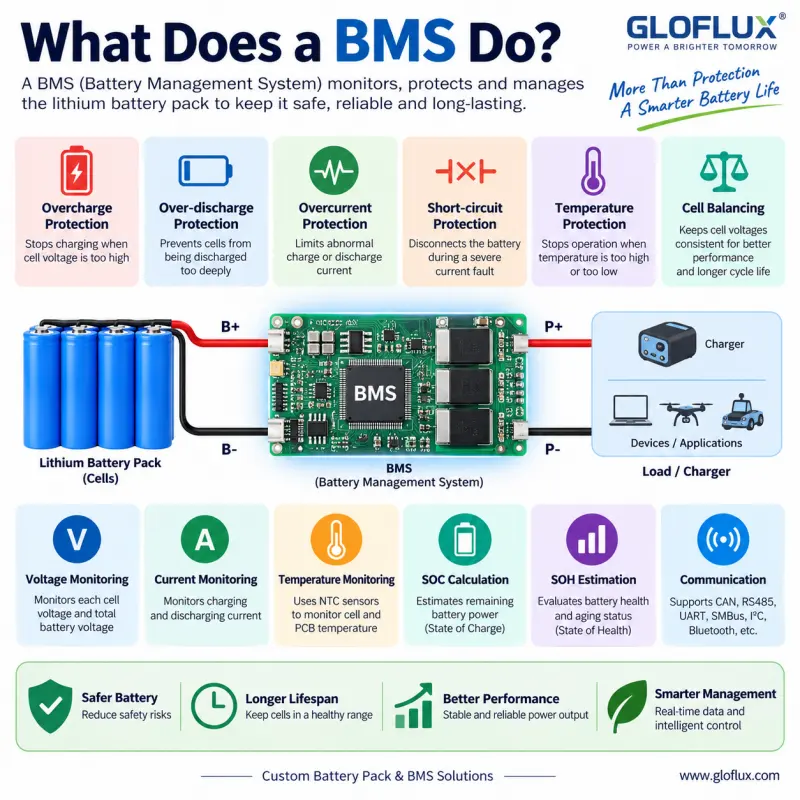
A Battery Management System, usually called a BMS, is one of the most important parts of many lithium battery packs.
The battery cells store the energy, but the BMS helps make sure those cells operate within acceptable voltage, current, and temperature limits.
So, what does a BMS actually do?
In simple terms, a BMS monitors the battery, protects it from abnormal operating conditions, and in more advanced systems, manages battery information and communication with the device.
Below are the most common questions about how a BMS works.
What Is a BMS?
BMS stands for Battery Management System.
It is an electronic system used to monitor and control a rechargeable battery pack.
Depending on the battery design, a BMS may monitor:
- Individual cell voltage
- Total battery voltage
- Charge current
- Discharge current
- Battery temperature
- State of charge
- State of health
- Cell balance
- Fault conditions
Simple battery packs may only require basic protection functions, while larger or smarter battery systems may need communication, data monitoring, fuel gauging, and several temperature sensors.
What Does a BMS Protect a Battery From?
One of the main jobs of a BMS is preventing the battery from operating outside its designed limits.
Typical protection functions include:
| Protection Function | What It Does |
|---|---|
| Overcharge protection | Stops charging when cell voltage becomes too high |
| Over-discharge protection | Prevents cells from being discharged too deeply |
| Overcurrent protection | Limits abnormal charge or discharge current |
| Short-circuit protection | Disconnects the battery during a severe current fault |
| High-temperature protection | Stops operation when the battery becomes too hot |
| Low-temperature protection | Can prevent charging or discharging at unsuitable temperatures |
The exact protection thresholds depend on the selected cells, battery chemistry, load, charging system, and application.
There is no single set of BMS parameters that works for every lithium battery.
How Does a BMS Monitor Cell Voltage?
In a multi-series battery pack, the BMS can monitor the voltage of each series cell group.
For example, a 4S lithium-ion battery contains four cell groups connected in series.
If standard lithium-ion cells charge to approximately 4.2V each, the BMS needs to make sure that one cell group does not rise above its permitted voltage even if the total pack voltage still appears reasonable.
This is important because individual cells do not always remain perfectly identical over time.
Small differences in:
- Capacity
- Internal resistance
- Temperature
- Self-discharge
- Aging
can gradually create voltage differences between cell groups.
Monitoring each group allows the BMS to react before one cell operates outside its safe range.
What Does Cell Balancing Do?
Cell balancing helps reduce voltage differences between cells or series cell groups.
Imagine a 4S battery where three cell groups are at 4.10V but one group reaches 4.20V earlier.
The BMS may need to stop charging because one group has already reached its upper limit, even though the other three are not completely charged.
Balancing helps keep the cell groups closer together.
Many BMS designs use passive balancing, which removes a small amount of energy from higher-voltage cells.
More sophisticated systems may use active balancing, although it is generally used when the battery architecture and application justify the extra complexity.
Does a BMS Control Battery Current?
Yes, current monitoring and protection are important BMS functions.
The BMS can monitor both:
Charging current
and
Discharging current
If the current exceeds the programmed or designed protection threshold, the BMS can disconnect the battery.
However, an important point is that the BMS does not determine the safe current of the complete battery by itself.
The complete current path includes:
Cells → Connections → BMS → Wire → Connector → Device
Every part must support the required current.
For example, using a 30A BMS does not automatically mean a battery can safely deliver 30A if the cells or connector are only designed for 10A.
If you need to select current ratings, see How to Choose the Right BMS for a Lithium Battery Pack.
Why Does a BMS Monitor Temperature?
Lithium batteries are sensitive to temperature.
Charging or discharging outside the recommended temperature range can reduce performance, accelerate aging, or create safety concerns.
A BMS can use one or more NTC temperature sensors to monitor important areas of the battery.
These may include:
- Battery cells
- BMS PCB
- MOSFETs
- High-current connection areas
If the temperature becomes too high or too low, the BMS can limit or stop charging and discharging.
Small battery packs may only need one NTC, while larger packs may use several sensors.
What Is SOC in a BMS?
SOC means State of Charge.
It is an estimate of how much usable energy remains in the battery.
You can think of it as the battery equivalent of a fuel gauge.
For example:
100% SOC means the battery is approximately fully charged.
50% SOC means roughly half of the usable charge remains.
More advanced BMS designs can calculate SOC using current measurement, voltage, temperature, battery capacity, and historical operating data.
SOC estimation is especially useful in:
- Medical devices
- Robots
- POS terminals
- Industrial equipment
- Communication devices
- Energy storage systems
Simple protection boards may not provide SOC calculation at all.
What Is SOH?
SOH means State of Health.
It describes how the battery has changed compared with its original condition.
As lithium batteries age, usable capacity can decrease and internal resistance can increase.
A smart BMS may estimate battery health based on information such as:
- Available capacity
- Cycle count
- Internal resistance trends
- Charging history
- Temperature exposure
- Operating history
SOH can be valuable for equipment where maintenance planning and battery replacement timing matter.
Can a BMS Communicate With the Main Device?
Yes.
Many smart battery systems communicate with the host device.
Common communication interfaces include:
- CAN
- RS485
- UART
- SMBus
- I2C
- Bluetooth
The device may receive information such as battery voltage, current, SOC, temperature, remaining capacity, cycle count, and fault status.
This allows the equipment to display battery information or respond to battery conditions.
However, not every battery needs communication.
A small rechargeable device may only need basic protection.
Is a BMS the Same as a PCM?
Not exactly.
A PCM, or Protection Circuit Module, mainly focuses on basic battery protection.
A BMS can provide those same protection functions but may also include cell monitoring, balancing, SOC calculation, communication, data recording, and other management features.
For small and simple lithium battery packs, a PCM may be enough.
For more complex multi-cell or smart battery systems, a BMS is often more suitable.
For a detailed comparison, read BMS vs PCM: What Is the Difference in Lithium Battery Packs?.
Does Every Lithium Battery Need a BMS?
Most rechargeable lithium battery products need some form of protection, but that does not mean every battery requires a complex smart BMS.
A small 1S lithium polymer battery may use a compact PCM with basic protection.
A 4S medical battery may require monitoring, temperature sensing, balancing, and communication.
A large energy storage battery may require a much more advanced BMS architecture.
The correct solution depends on the actual battery system rather than simply choosing the most complicated BMS available.
What Information Is Needed to Design a BMS?
When developing a custom battery pack, useful information includes:
| Information | Example |
|---|---|
| Battery chemistry | Li-ion / LiPo / LiFePO4 |
| Series configuration | 1S / 3S / 4S / 16S |
| Battery capacity | 5Ah |
| Continuous current | 8A |
| Peak current | 15A for 3 seconds |
| Charging current | 3A |
| Operating temperature | -10°C to 45°C |
| NTC requirement | 1 × 10K NTC |
| Communication | UART / SMBus / CAN |
| Connector | Customer specified |
| Application | Medical / POS / robot / industrial |
Providing these details early makes it easier to match the BMS with the cells and the complete battery architecture.
Final Thoughts
So, what does a BMS do?
Its most important job is to keep the lithium battery operating within its intended electrical and temperature limits.
Depending on the design, it may also balance cells, estimate remaining capacity, record battery information, communicate with the main device, and help manage battery performance throughout its service life.
The important thing is not to choose a BMS only by its voltage or amp rating.
The BMS should be designed together with the cells, load, charger, connector, wiring, temperature requirements, communication system, and mechanical structure of the battery pack.
FAQ
What is the main purpose of a BMS?
A BMS monitors and protects a rechargeable battery by controlling voltage, current, temperature, and other important operating conditions.
Can a lithium battery work without a BMS?
Rechargeable lithium batteries normally require appropriate protection. Simple batteries may use a PCM instead of a more advanced BMS.
Does a BMS stop overcharging?
Yes. Overcharge protection is one of the most common BMS functions, provided the system is correctly designed and matched with the cells.
Does a BMS balance battery cells?
Many multi-cell BMS designs include cell balancing, but not every BMS has the same balancing function or current.
Can a BMS tell how much battery capacity is left?
A smart BMS may calculate State of Charge and report remaining capacity, while a basic protection board may not provide this function.
What is the difference between a smart BMS and a basic BMS?
A basic BMS mainly handles monitoring and protection. A smart BMS may additionally provide SOC, SOH, cycle data, fault records, and communication with the host device.
Talk to the Manufacturer
Resources & Insights

High Capacity Lithium Battery for Wearables: High-Voltage LiPo Cell Design
2026-10-19
Cylindrical Battery Packs for Laptops: 2S vs 3S vs 4S Battery Design
2026-10-19

Stage Lighting Battery Pack: Prevent Voltage Drop & LED Flicker
2026-10-19

Best Rechargeable Batteries for Smart Devices: Performance, Safety, and Selection Guide
2026-10-19


